Enterprised Cloud
  • Features
    • eSignature
    • CRM
    • Estimates
    • Invoicing & Payments
    • Sell Services & Products
    • Client Portal
    • Why Enterprised
  • Pricing
  • Support
    • User Guide
    • FAQ
    • Blog
    • Support Policy
    • Refund Policy
    • Affiliate Terms
    • Terms of Service
    • Contact
  • Login
  • Start Free Trial
Select Page

Project Setting

Apr 30, 2025

User Guide  /  Projects

To Edit Project Setting just go to Dashboard

  1. Click on Propovoice > Settings
  2. Click on the Project tab
  3. Change your Project setting from here.
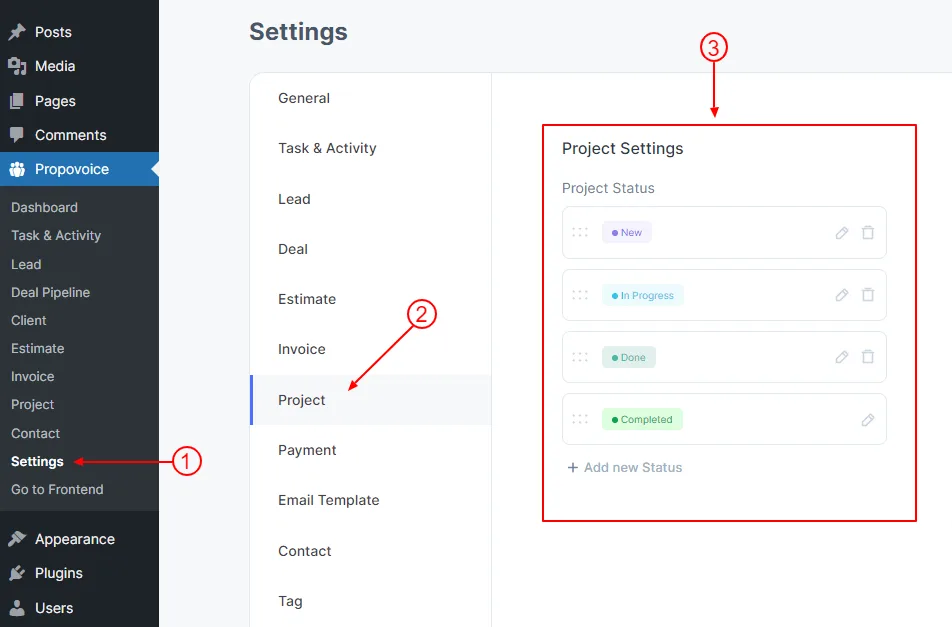
 

project setting

More in Projects

  • Add Project
  • Project Details

Still need help? Email support@enterprised.cloud or browse the User Guide.

All articles

Ready to run your whole business from one app?

CRM, estimates, invoicing, payments and eSignature for $29/month. Try it free for 30 days.

Start free trial Talk to sales
Enterprised Cloud

The all-in-one cloud platform that takes growing businesses from first lead to paid invoice.

  • Salessales@enterprised.cloud
  • Supportsupport@enterprised.cloud
Follow us on LinkedIn

Product

  • CRM & Deal Pipeline
  • Estimates
  • Invoicing & Payments
  • eSignature
  • Client Portal
  • Sell Services & Products
  • Pricing

Resources

  • User Guide
  • FAQ
  • Support
  • Why Enterprised
  • Blog
  • Customer Login
  • Create an Account

Company

  • Contact Us
  • Affiliate Program
  • Support Policy
  • Refund Policy

Legal

  • Terms of Service
  • Privacy Policy
  • Privacy Choices
UETA, ESIGN & GDPR compliant eSignatures PCI-compliant payment processing Bank-grade encryption ACH · Stripe · PayPal · WooCommerce
© 2026 Enterprised Cloud® LLC · Washington, USA · All rights reserved.  ·  Terms  ·  Privacy  ·  Privacy Choices
