Enterprised Cloud
  • Features
    • eSignature
    • CRM
    • Estimates
    • Invoicing & Payments
    • Sell Services & Products
    • Client Portal
    • Why Enterprised
  • Pricing
  • Support
    • User Guide
    • FAQ
    • Blog
    • Support Policy
    • Refund Policy
    • Affiliate Terms
    • Terms of Service
    • Contact
  • Login
  • Start Free Trial
Select Page

Edit Business

Apr 30, 2025

User Guide  /  Settings

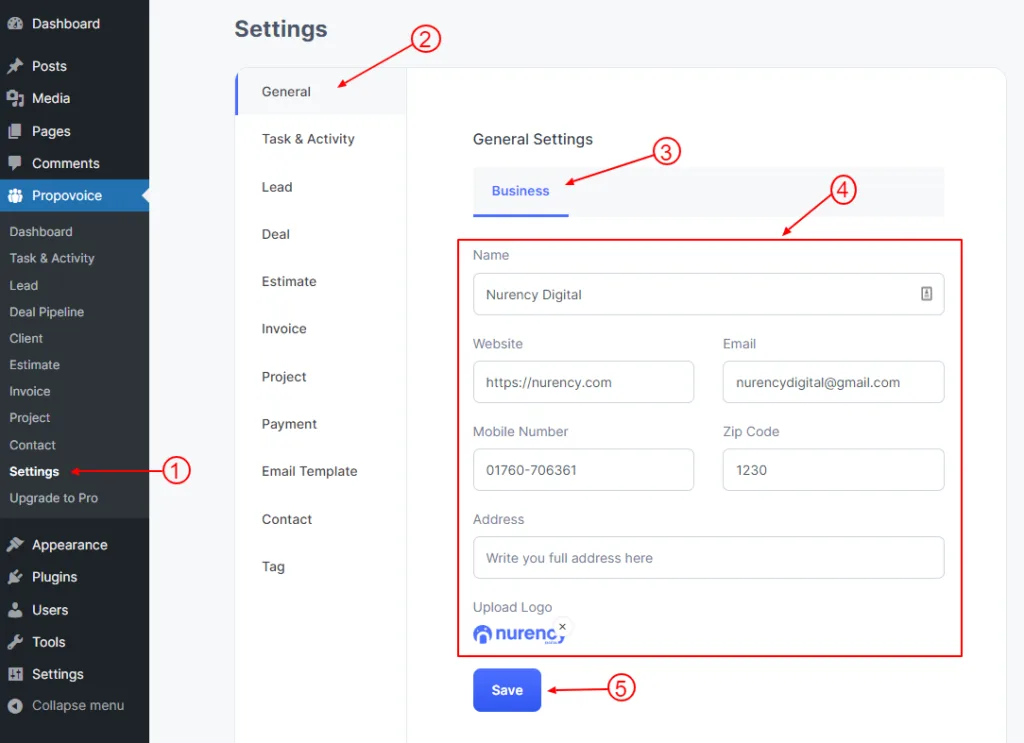
To Edit Business just go to Dashboard

  1. Click on Propovoice > Settings
  2. Click on the General tab
  3. Click on the Business tab
  4. Fill up or change your Business info from here.
  5. Click on the Save button.
business edit

More in Settings

  • Team Member
  • Team & Roles
  • Setup Payment
  • Email Settings
  • Custom Fields
  • Notification

Still need help? Email support@enterprised.cloud or browse the User Guide.

All articles

Ready to run your whole business from one app?

CRM, estimates, invoicing, payments and eSignature for $29/month. Try it free for 30 days.

Start free trial Talk to sales
Enterprised Cloud

The all-in-one cloud platform that takes growing businesses from first lead to paid invoice.

  • Salessales@enterprised.cloud
  • Supportsupport@enterprised.cloud
Follow us on LinkedIn

Product

  • CRM & Deal Pipeline
  • Estimates
  • Invoicing & Payments
  • eSignature
  • Client Portal
  • Sell Services & Products
  • Pricing

Resources

  • User Guide
  • FAQ
  • Support
  • Why Enterprised
  • Blog
  • Customer Login
  • Create an Account

Company

  • Contact Us
  • Affiliate Program
  • Support Policy
  • Refund Policy

Legal

  • Terms of Service
  • Privacy Policy
  • Privacy Choices
UETA, ESIGN & GDPR compliant eSignatures PCI-compliant payment processing Bank-grade encryption ACH · Stripe · PayPal · WooCommerce
© 2026 Enterprised Cloud® LLC · Washington, USA · All rights reserved.  ·  Terms  ·  Privacy  ·  Privacy Choices