
Are Electronic Signatures Legally Binding? ESIGN and UETA Explained
In the United States, electronic signatures are generally just as valid as handwritten ones. Here’s what the ESIGN Act and UETA say, what makes an e-signature enforceable and which documents are exceptions.
This article is general information, not legal advice. Laws vary by state and situation, so talk to an attorney about your specific documents.
The short answer
Yes. In the United States, an electronic signature generally has the same legal effect as a handwritten signature. Two laws make this so: the federal ESIGN Act and the state-level Uniform Electronic Transactions Act (UETA). Both establish that a signature or contract can’t be denied legal effect simply because it’s electronic.
The ESIGN Act
The Electronic Signatures in Global and National Commerce Act (ESIGN) is a federal law enacted in 2000. It applies to transactions in interstate and foreign commerce and gives electronic signatures and records the same legal standing as paper. It also includes consumer protections: when a law requires information to be provided to a consumer in writing, the consumer must consent to receive it electronically.
UETA
UETA is a model law that states adopt individually. The vast majority of states, along with Washington, D.C., have adopted a version of it. A small number of states, including New York and Illinois, rely on their own similar electronic signature laws instead. Together, ESIGN and these state laws give electronic signatures broad legal recognition across the country.
What makes an electronic signature enforceable?
A signature being electronic isn’t enough on its own. Courts generally look for these elements:
- Intent to sign. The signer meant to sign the document, for example by typing, drawing or clicking to adopt a signature.
- Consent to do business electronically. The parties agreed to use electronic records and signatures. Consent can often be shown by the circumstances, but consumer transactions may require specific disclosures and affirmative consent.
- Attribution. The signature can be tied to the person who signed, for example through email verification and a record of the signing session.
- Association with the record. The signature is attached to, or logically associated with, the document being signed.
- Record retention. The signed document is stored securely, in a way that preserves its integrity, and the signer can keep a copy.
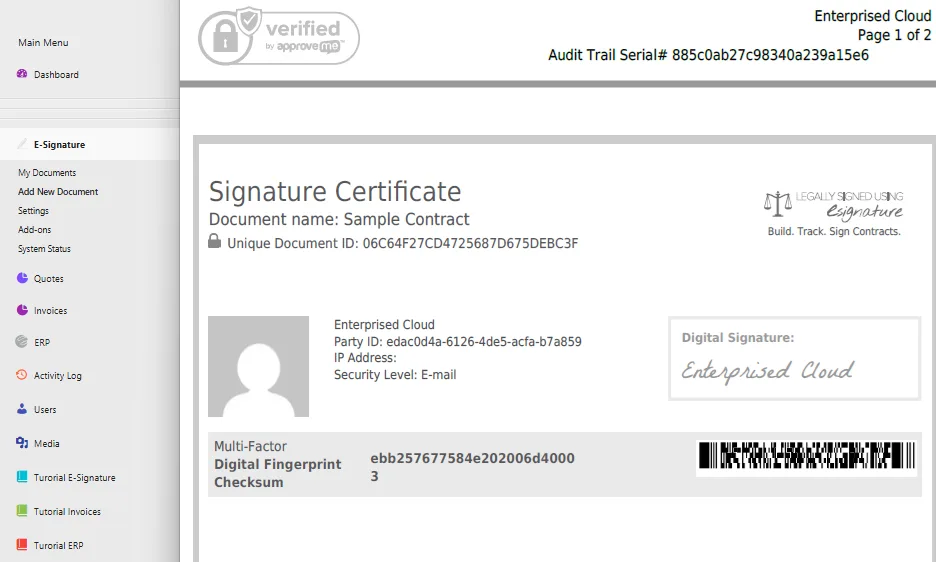
That’s why a good eSignature tool keeps a detailed audit trail (who signed, when, from where, and each step in the process) and issues a signature certificate with the final document.
Documents that usually can’t be signed electronically
ESIGN and UETA exclude certain documents. Exact rules vary by state, but common exceptions include:
- Wills, codicils and testamentary trusts (though some states now allow electronic wills)
- Adoption, divorce and other family law documents
- Court orders, notices and official court documents
- Notices of utility shut-off, foreclosure, eviction or default under a mortgage or lease
- Notices canceling health or life insurance
- Product recall and safety notices
- Documents that must accompany hazardous materials
Everyday business documents such as sales contracts, service agreements, NDAs, estimates, proposals, waivers, releases and most HR forms are typically fine to sign electronically.
What about outside the US?
Many countries recognize electronic signatures. In the European Union, the eIDAS regulation sets the framework, and data protection rules like GDPR govern how personal data in signed documents is handled. If you work with international clients, check the rules in their country.
Enterprised Cloud eSignature is UETA, ESIGN and GDPR compliant, with a full audit trail and signature certificate on every document.
Best practices for using e-signatures
- Use a tool that records an audit trail and issues a signature certificate.
- Verify the signer’s email or identity, especially for high-value agreements.
- Make sure every party receives a copy of the fully executed document.
- Store signed documents securely and keep them for your required retention period.
- When in doubt about a specific document type, ask an attorney.
More guides for growing service businesses
Run your whole business from one cloud app.
CRM, estimates, invoicing, payments and eSignature for $29/month. Try it free for 30 days.