
Best CRM for Freelancers and Small Service Businesses: A 2026 Buyer’s Guide
Most CRMs are built for big sales teams. If you sell services, you need something different: a tool that tracks the deal and also helps you quote, sign, invoice and get paid.
If you’re a freelancer, consultant, agency owner or contractor, you’ve probably tried a CRM and quietly gone back to spreadsheets, email threads and sticky notes. That usually isn’t a discipline problem. It’s a fit problem. Enterprise CRMs are designed for sales teams with dedicated reps, managers and operations staff. A five-person service business needs something leaner that covers more of the job.
This guide explains what a CRM should do for a small service business, which features actually move the needle, the costs that sneak up on you, and a simple checklist you can use to compare options.
What a CRM should do for a service business
For a product company with a big sales team, a CRM is mainly a pipeline and reporting tool. For a service business, the deal is only the beginning. After a client says yes, you still need to send a proposal, get it signed, plan the work, bill for it and collect payment. Every hand-off between tools is a chance to lose time or drop the ball.
The right CRM for a small service business should help you:
- Capture every inquiry from your website, email and referrals in one place.
- Prioritize the leads most likely to buy, so you spend time where it counts.
- Move deals forward with a clear pipeline and reminders for the next step.
- Quote and close with professional estimates and legally binding signatures.
- Deliver and bill by turning won deals into projects and invoices without retyping.
- Get paid with online payments and automatic reminders.
The features that matter most
1. A visual, customizable pipeline
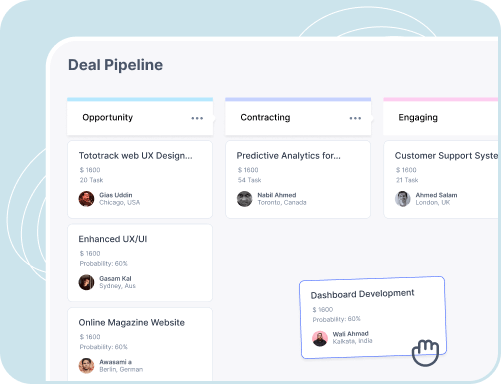
You should be able to see every open opportunity at a glance and drag it from stage to stage. Look for pipelines where you can rename, add and reorder stages so they match how you actually sell, whether that’s “Inquiry → Discovery call → Proposal sent → Won” or something else entirely.
2. Lead capture from your website
If new inquiries still arrive as emails you have to copy into a CRM by hand, some of them will be forgotten. A good CRM connects to your website contact forms so each submission becomes a lead automatically, with its source recorded.
3. Lead labels, tags and custom fields
Simple labels like Hot, Warm and Cold, plus tags and lead sources, make it easy to prioritize. Custom fields let you track details specific to your business, such as project type, budget range or location.
4. Tasks, notes and files on every record
When a client calls, you should be able to open their record and see the full story: past notes, attached files, open tasks and the next scheduled follow-up.
5. Built-in estimates, eSignatures and invoicing
This is where service businesses gain the most. When proposals, contracts and invoices live in the same system as the deal, an accepted estimate can become an invoice in one click, and nothing gets retyped. Make sure eSignatures are legally binding (in the US, look for UETA and ESIGN compliance) and come with an audit trail.
6. Online payments and automatic reminders
The fastest way to improve cash flow is to make paying you easy. Look for invoices with a Pay Now button that accepts ACH and cards, plus reminders that go out automatically before and after the due date.
7. A client portal
A portal gives clients one place to review estimates, sign documents, pay invoices and check on projects. It cuts down on “can you resend that?” emails and makes a small business look established.
Enterprised Cloud includes CRM, pipeline, estimates, eSignature, invoicing, payments and a client portal, with unlimited users.
Hidden costs to watch for
CRM pricing pages can be misleading. Before you commit, check for these common cost traps:
- Per-user pricing. A low monthly price per seat grows quickly as you add teammates or contractors.
- Feature tiers. Automation, custom fields or integrations are often locked behind higher plans.
- Add-ons for documents and signatures. Proposal tools and eSignature apps are frequently separate subscriptions.
- Separate invoicing software. If the CRM can’t invoice, you’ll pay for another tool and copy data between them.
- Onboarding and setup fees. Some vendors charge for implementation before you can even start.
Add up the full stack you’d need (CRM, proposals, eSignature, invoicing and payments) and compare that total, not just the CRM’s headline price.
A quick CRM checklist for service businesses
- Can I customize pipeline stages to match my sales process?
- Do website inquiries become leads automatically?
- Can I import my existing contacts from a spreadsheet (CSV)?
- Can I create and send branded estimates from a deal?
- Are eSignatures included and legally binding, with an audit trail?
- Can an accepted estimate become an invoice without retyping?
- Can clients pay online by ACH and card?
- Are payment reminders automatic?
- Is there a client portal?
- Is pricing flat, or will it grow with every user I add?
The bottom line
The best CRM for a freelancer or small service business isn’t the one with the longest feature list. It’s the one that covers your whole lead-to-cash workflow without forcing you to stitch together four or five subscriptions. Start with your process, use the checklist above, and take advantage of free trials to test it with a real client before you decide.
More guides for growing service businesses
Run your whole business from one cloud app.
CRM, estimates, invoicing, payments and eSignature for $29/month. Try it free for 30 days.