
How to Write a Winning Estimate: Structure, Examples and Tips
A clear, professional estimate does more than list prices. It builds trust, answers questions before they’re asked and makes it easy for the client to say yes.
Whether you call it an estimate, a quote or a proposal, this document is often the moment a prospect decides whether to hire you. A vague or messy estimate creates doubt. A clear one shows you understand the job and makes the decision easy.
Estimate, quote or proposal: what’s the difference?
- Estimate: your best calculation of what the work will cost, based on what you know today. It may change if the scope changes.
- Quote: a fixed price for a clearly defined scope, usually valid for a set period.
- Proposal: a broader sales document that explains your approach, timeline and value, and usually includes pricing.
Many businesses blend these. The structure below works for all three.
What to include in every estimate
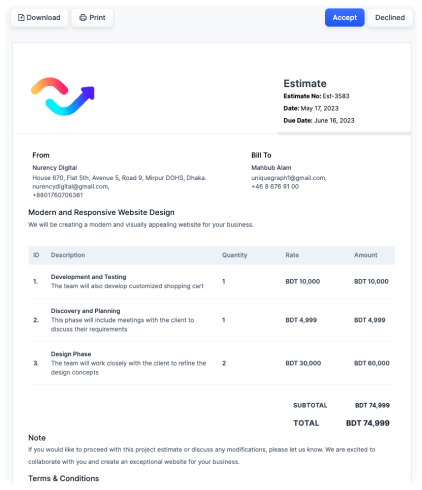
- Your branding and contact details. Logo, business name, email and phone.
- Client details. Name, company and contact information.
- Estimate number and dates. An issue date and a “valid until” date.
- A short summary of the project. One or two sentences that show you understand the client’s goal.
- Itemized line items. Each with a description, quantity, rate and amount.
- Taxes, discounts and fees. Shown clearly so there are no surprises.
- Total. Easy to find at a glance.
- Terms. Payment schedule (for example, a deposit up front), what’s included and excluded, and how changes are handled.
- A clear next step. An Accept button or signature line.
A simple structure you can reuse
Here’s a layout that works for most service businesses:
- Title: “Website redesign for Acme Co.” (specific beats generic)
- Overview: “Acme needs a faster, mobile-friendly website that converts more visitors into leads.”
- Line items: Discovery and planning; Design; Development; Launch and training
- Timeline: key milestones and an estimated completion date
- Terms: “50% deposit due on acceptance, 50% on completion. Estimate valid for 30 days.”
- Accept: a one-click accept button or eSignature
Tips that help estimates get approved
Break the work into clear line items
A single lump sum invites questions. Itemizing shows where the money goes and makes it easier for the client to see the value.
Write descriptions in the client’s language
Describe outcomes, not just tasks. “Mobile-friendly design so customers can book from their phones” means more to a client than “responsive CSS.”
Set an expiration date
A “valid until” date protects you from price changes and gently encourages a decision.
Make accepting effortless
Every extra step (printing, signing, scanning, emailing back) costs you time and sometimes the deal. Online estimates with an Accept button or built-in eSignature remove that friction.
Send it fast and follow up automatically
Speed signals professionalism. Send the estimate while the conversation is fresh, then set reminders so a polite follow-up goes out if the client hasn’t responded.
Choose a template, add your items and send. Clients accept in one click, and you convert it to an invoice instantly.
After the client says yes
The work isn’t done when the estimate is accepted. Turn it into a project, schedule the first task and, if you take deposits, send the deposit invoice right away. When your estimates, projects and invoices live in the same system, this takes seconds instead of an afternoon.
More guides for growing service businesses
Run your whole business from one cloud app.
CRM, estimates, invoicing, payments and eSignature for $29/month. Try it free for 30 days.